

Relay Conference Captioning (RCC)
Participants can read real-time captions during calls, video meetings, or webinars from almost any internet-connected device, helping to communicate clearly with coworkers, providers, family, and friends.

Book Your RCC Reservation
Relay Conference Captioning (RCC) provides live, real-time captions for virtual meetings, webinars, and conference calls. Whether you’re a business looking to make your meetings accessible for everyone, or a federal employee who is deaf, hard of hearing, or has a speech disability, Relay Texas offers a solution to help you fully participate.
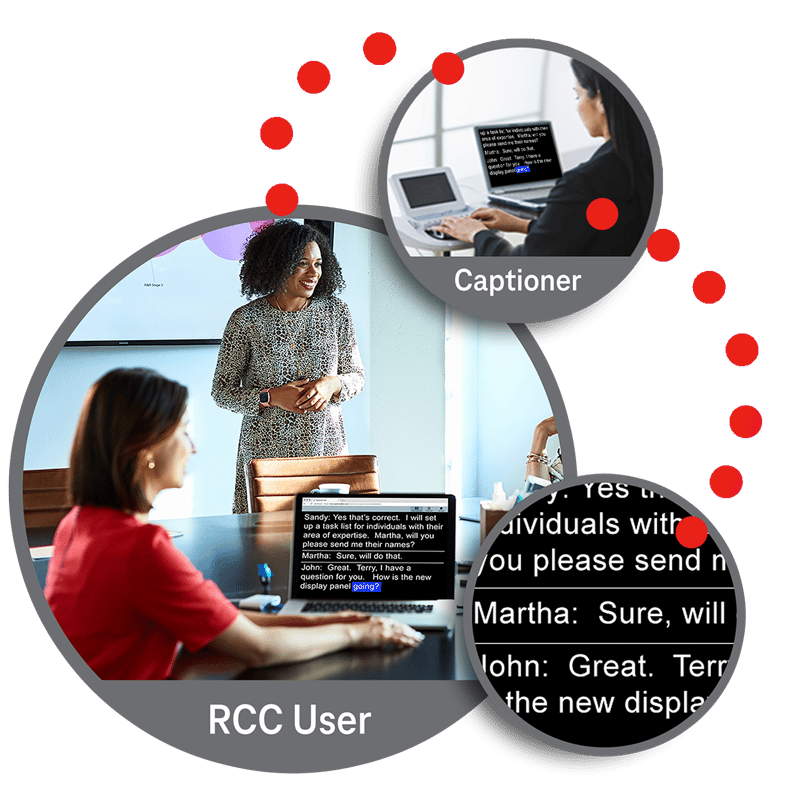
How Does RCC Work?
The minimum system requirements to use RCC service are:
- A high-speed Internet connection
- Microsoft Windows 10 or newer, or OS X
- Internet Explorer, Chrome, Firefox, or Safari with cookies and JavaScript enabled
A captioner joins your call or meeting.
The captioner listens and types what is said in real time.
Click a secure RCC link in your browser.
Speak on the call or type messages for the captioner to read aloud.
Relay Texas Customer Profile
The Relay Texas Customer Profile form allows consumers to list their preferences for calls, such as:
- Frequently dialed numbers
- Emergency numbers
- Preferred gender of operator
- Announcing relay service
As a consumer, you have flexibility in updating your preferences at any time.

FAQs
We want to simplify your life. In the following you see answers to some questions that might arise.
RCC reservation allows multiple users to join the same RCC link and read live captions for your event, such as a conference call, video meeting, or webinar.
People reserving RCC should submit their request at least four business days before the event. You can still request RCC with less notice, and they will make their best effort to cover it.
To request RCC, individuals complete the RCC reservation form and email it to the Texas Public Utility Commission at the address listed on the page. After your request is reviewed and approved, you receive an email confirmation with your RCC link.
About 10 minutes before the event, the captioner joins your conference call, video meeting, or webinar. When you are ready, you click the RCC link from your confirmation email, begin reading the captions, and, if you want audio, you also join the event’s audio bridge.
